What is a Student ID Card Printer?
A student ID card printer is a specialized device used by schools, colleges, and universities to print identification cards for students. These printers create durable plastic cards that include information such as a student’s name, photo, ID number, barcode, or RFID chip, allowing institutions to easily identify and manage students in schools or on campus.
Why Schools Need a Student ID Card Printer
Schools and educational institutions rely on student identification cards to manage campus activities, improve security, and streamline daily operations. Having a student ID card printer on-site allows schools to produce professional ID cards quickly and maintain full control over their identification system.
ID cards printed at schools and universities for students are widely used for campus access, library systems, attendance tracking, cashless payments, transportation passes, and more.
Issuing an ID card for students goes far beyond just identification, which serves as an essential tool for security, access control, and efficient campus management.
With a student ID card shown, staff, faculty, and security personnel in school can quickly verify a student’s identity, reducing the risk of unauthorized individuals entering campus and ensuring that only registered students can access school facilities.
Many student ID cards are integrated with RFID or magnetic stripe technology to control entry to buildings, dormitories, libraries, and labs.They can be linked to school databases for attendance tracking, class registration, and event participation.ID cards for students make it easier for administrators to monitor student activity, manage services, and maintain accurate records.
Types of ID Card Printers for Students
When choosing an ID card printer for student cards, it’s important to understand the main types of printers available—each suited to different needs, budgets, and security requirements. Here are the primary categories:
- Direct-to-Card (DTC) Printers
These printers print by applying ink (dye‑sublimation or thermal transfer) directly onto the surface of PVC cards, producing standard student ID cards with photos and basic details.
They are popular among small- to medium-sized schools that need simple student photo ID cards without advanced security features, given they are
- Reliable and affordable
- Fast printing for high volumes
- Ideal for basic ID cards, membership cards, and access badges
2. Retransfer (Reverse Transfer) Printers
Instead of printing directly onto the card, the printer first prints the image onto a transparent film and then transfers it to the card surface, outputting high-quality and secure student ID cards.
They are the first choice for universities, large campuses, or institutions that require high-resolution graphics, complex background designs, or secure ID accreditation.
For your better understanding, watch the video below to learn more about direct to card vs retransfer ID printers
3. Single-Sided vs. Dual-Sided Printers
Single-sided printers print on one side of the card only—suitable for basic cards.
Dual-sided printers print on both sides, allowing extra information such as emergency contacts, school rules, or barcode data on the back.
4. Magnetic Stripe & Smart Card Encoding Printers
When students need to use their cards to pay or access libraries, this will require schools to purchase printers that can encode the following:
- Magnetic stripes (for library checkout or door access)
- Contact Smart Chips.
- Contactless chips / RFID / NFC
- Apart from bringing great convenience for students, this can also be helpful for the data storage of students for schools and universities.
5. High-Volume Printers
Since the printer features an automatic card feeder for batch printing and high-capacity ribbons, they can continuously output high-volume ID cards to meet the bulk demands at large universities and institutions. Say, a university needs to issue thousands of ID cards for its students every term.
Where to Buy Student ID Card Printers Online?
You can search terms such as “student ID card printer near me” on Google; most likely, a page with a list of student ID card printing machine sellers and suppliers will pop up. Then you can select them one by one to browse for your best choice.
In the case that there isn’t any student card printer for sale in your place or country, then you’ll have to buy one by importing it from another country. Typing search terms ending with a specific country name will do. For instance: “student ID card printer manufacturer in China,” “student ID card printer on Amazon,” or “student ID card printer supplier.” You can search freely online to source ID card printers for students.
You can also go to physical stores for the printer if there are any in your places. But this should come as your second option, as it will cost you more to buy one.
Card Design and Software Compatibility
Designing and printing student ID cards requires not only a reliable card printer but also compatible design software that allows schools to create professional and secure ID cards efficiently. The right software ensures that student information, photos, barcodes, and security features are correctly formatted and printed.
I’d highly recommend buying a student ID card printing machine from the supplier or manufacturer, whichever is better, that can provide you software with high customization flexibility. That way, you can design student ID cards freely to create card layouts with elements such as student photos, names, ID numbers, school logos, barcodes, QR codes, and expiration dates.
Database integration: A key feature of ID card software is the ability to connect with school databases or student information systems. This allows the software to automatically import student data, such as names, student numbers, and photos, reducing manual entry and minimizing errors. Bulk printing becomes easier because multiple cards can be generated automatically from the database.
Security Features for School ID Cards
Security is a major factor in education environments. Advanced ID card software can also support security and verification features. These include barcodes, QR codes, magnetic stripes, or smart chip encoding. Such features help schools use ID cards for library access, attendance tracking, cafeteria payments, and campus access control. More advanced printers for student ID cards feature holographic overlays, UV printing, watermarks, encoding, and anti-counterfeiting, which are more highly priced and are widely used at universities.
Cost Considerations
To own a student ID card printer, you should consider more than the sole number on its price tag. For a student ID card printing machine to function and serve, it requires a number of accessories and consumables, such as ribbons and blank PVC cards, among others. In the long run, the cost of replacing printing ribbons and replenishing blank PVC cards will exceed the printer price significantly.
Therefore, if you need only a small quantity of student ID cards with low frequency, you’d better seek student ID card printing services for solutions, which will definitely do you good. In other words, if you are the procurement personnel from a kindergarten or primary school without many kids or students, you don’t need to buy a printer for student ID cards.
Recommended Student ID Card Printer Setup
When setting up a student ID card printer for new semesters, it requires a number of additional pieces of equipment to get the work done of making student ID cards and issuing them.
- PVC cards: A student ID card printing machine can usually hold a maximum of 100 pcs of blank ID cards to print, which is far enough to accommodate the wave of flocking students for new terms, necessitating the replenishment of more PVC cards from time to time.
- Ribbon: Likewise, ribbons are consumed as fast as blank PVC cards; thus, it’s essential to prepare sufficient amounts beforehand.
- ID card camera/webcam: It’s a must-have for schools to make ID cards for students. To capture students’ faces in high resolution for making better-quality ID cards, a standalone camera can achieve it with ease. If not, taking photos for students with the integrated webcam or a computer or laptop can also be feasible. Using a smartphone instead will certainly improve the image quality.
- Signature pad: This device is used to get a signature from students in the course of making student ID cards. An electric signature comes as a means to establish a unique identity for the student and verifies their consent for using and accessing certain resources and services afterward.
- Card laminator: This device is usually required for printing single-sided ID cards, as the printer doesn’t come with card laminating techniques. If you need an ID card printer with card laminating functionality, make sure you confirm with the seller or supplier about that.
- Card punching tools: Not all student ID cards need to be perforated. Nowadays, it’s more prevalent to see students wear ID cards attached with lanyards or badge holders. Make a choice accordingly.
Conclusion
Choosing the right student ID card printer ensures schools can produce secure, professional, and durable ID cards efficiently while maintaining full control over campus identification systems. For the majority of schools and universities, they should take the key factors below into account to heighten the likelihood of buying a student ID card printing machine that will work best for them:
- Printing technology
- Print quality
- Security features
- Software compatibility
- Budget and printing volume
Masung has this single-sided and double-sided ID card printer series for your choice:
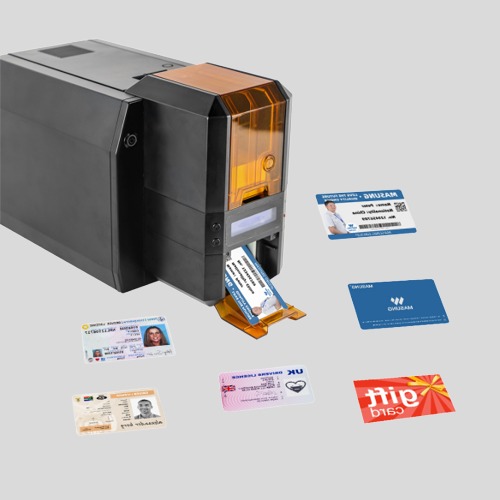
Masung MS-CH22, Single-Sided ID Card Printer for students
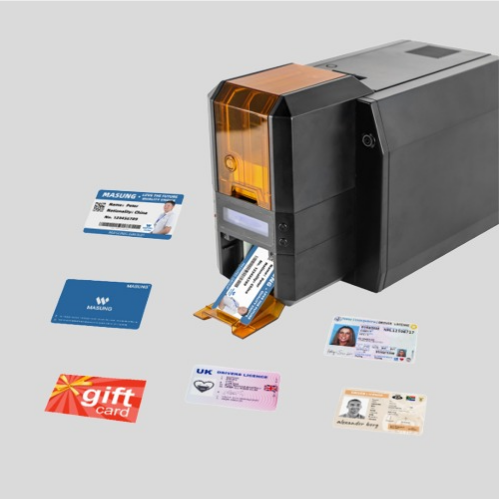
Masung MS-CH22K Double-Sided ID Card Printer, 300 DPI Thermal Sublimation Name Tag Printer for Event & Conference
They share the features below:
- The thermal transfer printing technique ensures a high-resolution print of text, barcodes, graphs, and images.
- Advanced security & expandability with optional RFID, contact IC, and magnetic stripe encoding, plus physical lock features for controlled issuance.
- Personalizable software allows you to edit the print freely.
- The fast and efficient card issuance printer produces double-sided monochrome cards in approximately 12 seconds and full-color cards in about 42 seconds.
- And more for you to find out.