A kiosk printer module is an essential component of self-service terminals, enabling users to print receipts, tickets, labels, vouchers, and other documents without staff assistance. From ticket vending machines and ATMs to healthcare kiosks and retail self-checkout systems, kiosk printer modules play an important role in providing fast, reliable, and convenient printing functionality.
Unlike conventional desktop printers, kiosk printer modules are designed for integration into self-service equipment. Their compact structures, flexible mounting options, automatic paper handling, and electronic control interfaces make them suitable for continuous operation in various commercial and industrial environments.
This article explores how a kiosk printer module works, its key components, important technical features, and the factors to consider when selecting one.
1. What Is a Kiosk Printer Module?
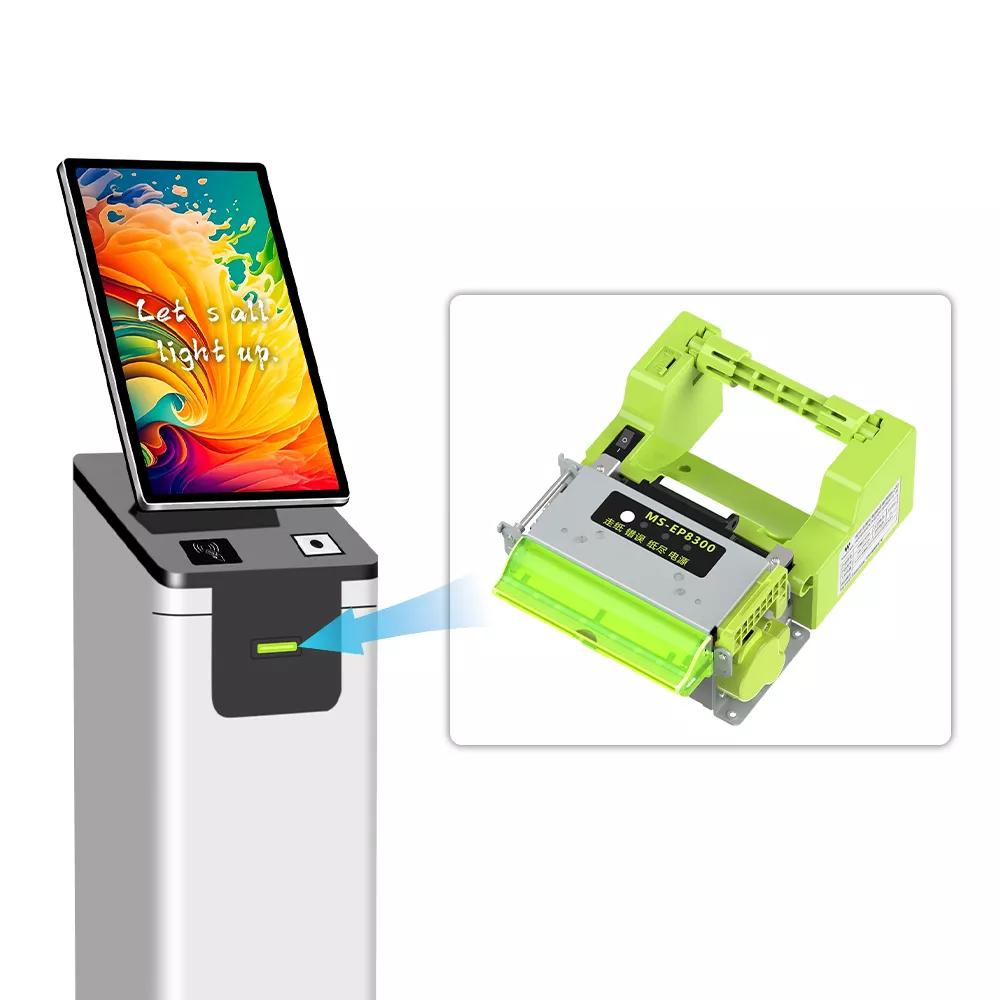
A kiosk printer module is an embedded printing mechanism designed to be installed inside self-service terminals, vending machines, ATMs, and other automated devices.
It typically consists of a thermal print mechanism, paper-feeding system, cutter, control board, and communication interfaces. Depending on the design, some modules also integrate paper sensors, automatic paper loading, and paper-out detection.
Most kiosk printer modules use direct thermal printing technology. This method generates images and text by applying heat to specially coated thermal paper, eliminating the need for ink cartridges or ribbons.
Compared with traditional printing systems, thermal kiosk printer modules offer several advantages:
- Compact design for limited installation spaces.
- Fast printing speeds for efficient customer service.
- Low maintenance requirements without ink or toner.
- Automatic paper feeding and cutting.
- Flexible communication interfaces for system integration.
- Reliable performance in self-service environments.
2. Key Components of a Kiosk Printer Module
Understanding the main components helps equipment manufacturers evaluate printer compatibility and long-term operating performance.
Thermal Printhead
The thermal printhead is responsible for generating text, graphics, barcodes, and other printed information. Its resolution, usually measured in dots per inch or dot density, determines printing clarity.
Common configurations include 203 dpi and higher-resolution options, depending on application requirements.
Paper Feeding Mechanism
The paper-feeding mechanism transports thermal paper through the printing path. Its design affects paper-loading convenience, feeding accuracy, and printing stability.
Automatic paper-loading functionality is particularly useful in unattended kiosks where manual intervention should be minimized.
Automatic Cutter
Many kiosk printer modules feature an integrated cutter that automatically separates receipts or tickets after printing. Full-cut and partial-cut options are available for different applications.
Cutter durability is an important consideration for equipment operating with high daily print volumes.
Control Board and Communication Interfaces
The control board processes printing commands and coordinates the operation of the printhead, paper-feeding mechanism, and cutter.
Common communication interfaces include USB, RS232, and TTL serial connections. Some modules also support customized interfaces to meet specific system integration requirements.
3. Important Technical Specifications to Consider
Selecting the right kiosk printer module requires evaluating several technical parameters.
| Technical Parameter | What to Consider |
|---|---|
| Paper Width | Common options include 58 mm and 80 mm |
| Printing Resolution | 203 dpi or higher, depending on requirements |
| Printing Speed | Consider the expected customer volume |
| Printing Width | Ensure compatibility with the required content layout |
| Paper Thickness | Check the supported thermal paper range |
| Cutter Type | Full cut or partial cut |
| Cutter Life | Important for high-frequency printing |
| Communication | USB, RS232, TTL, or customized interfaces |
| Power Supply | Match the voltage and current requirements of the host equipment |
| Installation | Check dimensions, mounting holes, and paper-exit direction |
Beyond these specifications, developers should also evaluate operating temperature, paper-out detection, jam detection, and other features that affect operational reliability.
4. Typical Applications of Kiosk Printer Modules
Kiosk printer modules are widely used across industries where automated document printing is required.
Ticket Vending Machines
Transportation systems, cinemas, and entertainment venues use embedded thermal printers to issue tickets, admission passes, and booking confirmations.
ATMs and Banking Terminals
Banking equipment uses compact printer modules to print transaction receipts, account information, and service records.
Retail and Self-Service Checkout Systems
Retail kiosks and self-checkout terminals use thermal printing modules to generate purchase receipts, order confirmations, and payment records.
Healthcare Self-Service Kiosks
Hospitals and clinics integrate kiosk printers to issue registration slips, queue tickets, appointment confirmations, and other patient-related documents.
Logistics and Parcel Terminals
Automated parcel lockers and logistics terminals may use embedded printers to generate collection receipts, shipping labels, and pickup information.
5. How to Choose the Right Kiosk Printer Module
Before purchasing a kiosk printer module, equipment manufacturers should evaluate their application requirements rather than focusing on printing speed or price alone.
First, determine the required paper width, printing area, and document format. An 80 mm printer may be suitable for standard receipts, while a 58 mm model can be more appropriate for compact equipment.
Second, consider the expected printing frequency. Applications with high transaction volumes require durable printheads, reliable paper-feeding mechanisms, and long-life cutters.
Third, verify communication compatibility with the host system. Confirm that the printer’s command set, interfaces, drivers, and SDK support the intended operating environment.
Finally, evaluate installation dimensions and mechanical design. A printer module should fit the available enclosure while providing convenient access for paper replacement and maintenance.
For specialized equipment, working directly with a manufacturer that offers OEM and ODM customization can help address unique requirements involving mechanical structures, interfaces, firmware, paper paths, and mounting configurations.
6. Kiosk Printer Modules from Masung
As a printer manufacturer specializing in embedded printing technology and customized printing solutions, Masung develops kiosk printer modules for various self-service applications.
Its product portfolio includes compact thermal printing modules designed for ticket vending machines, ATMs, retail kiosks, healthcare terminals, and other automated equipment.
Masung also provides customization options covering mechanical design, paper width, communication interfaces, firmware, and system integration to accommodate different equipment requirements.
Whether you are developing a new self-service terminal or upgrading an existing machine, selecting a suitable kiosk printer module is essential for achieving reliable printing performance and a better user experience.
Looking for a kiosk printer module for your next project? Contact Masung to discuss your application requirements and explore suitable embedded printing solutions.