Student ID cards underpin nearly every campus function, from building access and library checkout to cafeteria payments and attendance tracking. Selecting the right school id card printer directly shapes operational efficiency, data security, and long-term costs. Whether you are upgrading an existing system or launching in-house issuance for the first time, this guide breaks down key technologies, use cases, and selection criteria to help you match a student card printing solution to your campus needs.
WWhy In-House School ID Card Printing Makes Sense
Outsourcing ID production often means long turnaround times, delayed reprints, and repeated sharing of student personal data. Bringing a school id card printer machine on campus resolves most of these issues.
First, it puts timing fully in your control: new students receive cards on orientation day, and lost badges can be replaced on the spot. Second, it strengthens data privacy by keeping student photos, grade information, and emergency contacts within your campus system. Third, for medium and large enrollments, in-house printing delivers a lower per-card cost over multi-year use compared to outsourced batches.
Common Campus Scenarios for ID Card Issuance
Before evaluating hardware, map out how your school will use its school id printer. Typical use cases include:
- Annual enrollment batches: Mass production of student IDs at the start of the academic year, where speed and automatic feeding are critical.
- On-demand reprints: Walk-in replacement for lost or damaged cards throughout the school year.
- Faculty and staff badges: Credentials with access control or attendance encoding.
- Visitor and event passes: Short-term badges for campus events, parent days, or summer programs.
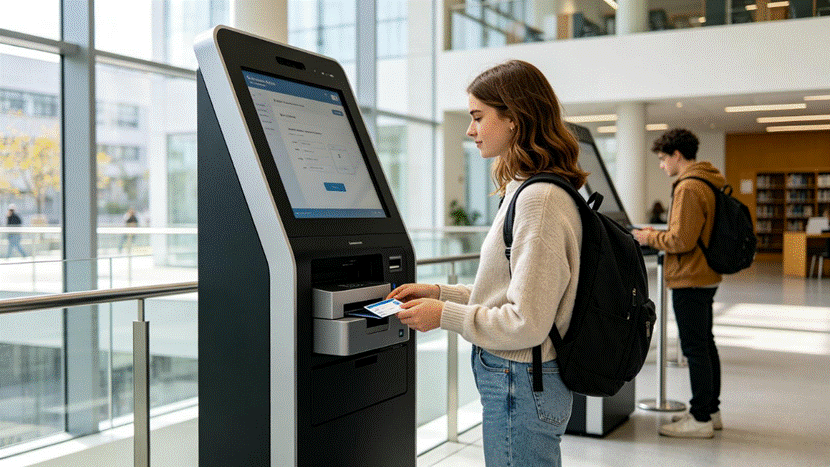
- Self-service kiosk issuance: 24/7 automated card pickup or replacement in student centers, libraries, or enrollment halls, requiring an embeddable printer module.
Printing Technologies for School ID Card Printers
Two core technologies dominate the campus ID market, each suited to different durability and budget requirements.
Dye-Sublimation (Thermal Sublimation) Printers
Dye-sublimation printers use heat to transfer dye onto PVC cards for smooth, photo-quality output. The dye bonds with the card surface, resisting smudges and scratches for years of daily wear. This is the standard for official student and faculty IDs that must remain legible for multiple school years.
Direct-to-Card (DTC) Printers
Direct-to-card printers print directly onto the card surface. They offer lower upfront cost and faster speed, but the print sits on top of the card and wears down more quickly with heavy handling. They work well for temporary badges, visitor passes, and one-year use cases.
| Feature | Dye-Sublimation School ID Printer | Direct-to-Card School ID Printer |
| Print quality | Photo-grade, smooth gradients | Good, but visible dot pattern |
| Durability | Excellent, 3–5 year card life | Moderate, 1–2 year card life |
| Print speed | Moderate | Fast |
| Upfront cost | Higher | Lower |
| Per-card cost | Moderate | Lower |
| Ideal use | Permanent student/faculty IDs | Temporary badges, event passes |
Single-Sided vs. Double-Sided School ID Card Printer Machines
Single-Sided ID Printers
Single-sided models print only on the front of the card. They are simpler, more affordable, and work well if your school ID only carries a photo, name, ID number, grade, and school logo.
Choose single-sided if:
- Your cards have minimal information
- Budget is the primary concern
- You issue simple IDs for younger students
Double-Sided ID Printers
Double-sided printers automatically flip the card and print on both sides in one pass. The back side can hold barcodes, QR codes, magnetic stripe data, emergency contact information, school rules, or a calendar of important dates. Many schools use the reverse side for library barcodes, meal plan details, or bus route information.
Choose double-sided if:
- You want to combine multiple functions on one card
- You need magnetic stripe, barcode, or chip encoding
- You want a more professional, information-rich card
- You expect the card to be used across several campus departments
For most K–12 schools and colleges, a double-sided school id card printer delivers the best long-term value because it supports expanding use cases as your campus grows.
Critical Factors When Selecting a School ID Printer
- Print volume and speed
Estimate annual and peak-period volume. A 100-card automatic feeder and mid-volume output speed prevent bottlenecks during enrollment week.
- Encoding and security
If your campus uses proximity access, cashless dining, or attendance tracking, look for optional RFID, contact IC, and magnetic stripe encoding modules. Physical lock features protect equipment and student data.
- Connectivity and compatibility
USB is standard; Ethernet support is valuable for networked campus environments. Verify compatibility with your student information system and operating systems before purchase.
- Card compatibility
A flexible school id card printer machine should support standard CR-80 PVC cards as well as composite, pre-printed, matte, and glossy finishes for different use cases.
- Deployment form factor
Desktop models suit administrative offices and staffed enrollment stations. For self-service kiosk projects, choose an embeddable printer module designed for terminal integration.
Recommended Student Card Printing Solutions for Schools
Desktop In-House Solution: Masung MS-CH22K
For administrative offices handling enrollment batches, on-demand reprints, and staff badges, the Masung MS-CH22K Double-Sided ID Card Printer balances quality, speed, and expandability.
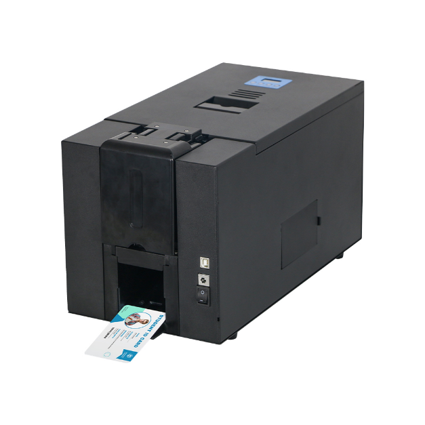
It uses 300 DPI dye-sublimation technology to produce sharp student photos and vivid school colors that withstand daily wear. Its 100-card automatic feeder and 42-second full-color dual-sided print speed support efficient enrollment processing, while monochrome double-sided cards print in roughly 12 seconds for fast reprints. Optional RFID, contact IC, and magnetic stripe encoding let the system grow with your campus, and physical lock features support data security. Flexible USB, Ethernet, and RS232 connectivity integrates smoothly with existing administration systems.
Embedded Kiosk Solution: Masung MS-S22
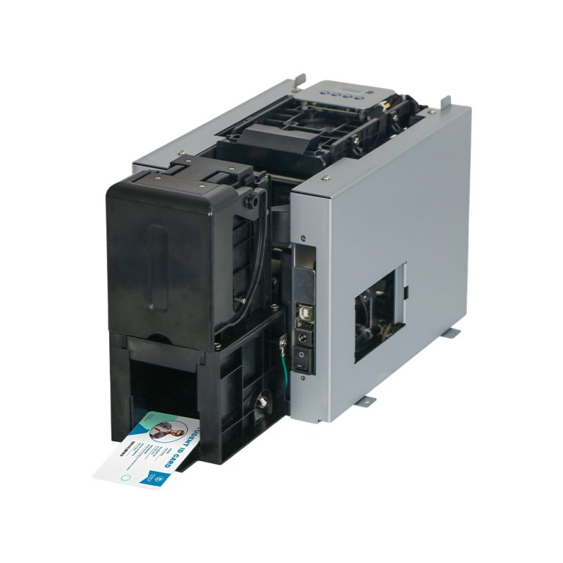
For campuses deploying self-service ID kiosks in student centers, libraries, or enrollment halls, the Masung MS-S22 Embeddable Card Printer Module is built for terminal integration.
With 300 DPI resolution and automatic double-sided printing, it delivers full-color student IDs and visitor passes matching desktop quality. It supports standard CR-80 PVC and composite cards, includes a 100-card input hopper for uninterrupted self-service operation, and features dual-way card ejection for flexible kiosk design. Encrypted RFID ribbon technology secures the card personalization process, and USB 2.0 with optional Ethernet and RS232 ensures reliable integration with campus self-service systems. It works well alongside desktop printers to create a hybrid issuance model: bulk enrollment in the admin office, and 24/7 replacement via student-facing kiosks.
Frequently Asked Questions
Q: How long does a printed school ID card last?
A: With dye-sublimation printing and a protective overlay, a student ID typically lasts 3–5 years with normal daily use.
Q: Can one school id printer produce both student IDs and staff badges?
A: Yes. A dual-sided printer with encoding capabilities can handle student IDs, faculty access badges, visitor passes, and event credentials using different templates and card stocks.
Q: Is in-house printing more secure than outsourcing?
A: Yes, because student photos, personal information, and access credentials remain within your campus system. Physical locks and encrypted printing add further protection.
Q: Can a school ID printer work inside self-service kiosks?
A: Yes. Embeddable modules like the Masung MS-S22 are designed for terminal integration, enabling automated, on-demand card issuance and replacement outside regular office hours.
Choosing the right school id card printer is an investment in smoother operations, stronger data security, and lower long-term costs. By aligning printer capabilities with your actual enrollment volume, card functionality, and deployment model, you can select a student card printing solution that serves your campus reliably for years.